Local Action
Action
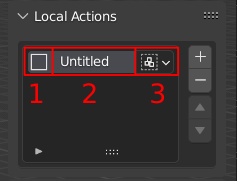
A local Action consist of 3 Parts.
- 1. Icon
By clicking on the Icon it can be changed to customize the look of the Action.
- 2. Label
By double-click on the Label it can be changed and by default it will be
Untitled.- 3. Execution Mode
This can be changed to execute between
Group-Execution andIndividual-Execution.Group: Performs the current action on all selected objects without separating them (Default Behavior)
Individual: Performs the current action on all selected objects individually. Therefore, the action is executed as many times as there are selected objects.
Operations
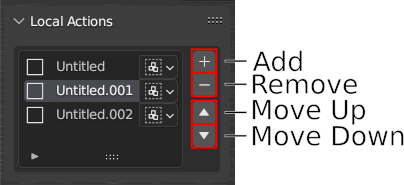
Add
Adds a new Local Action to the project and select it.
Remove
Remove to selected Local Action.
Move Up
Move to selected Local Action one position up in the list and swap it with the next upper Action.
Move Down
Move to selected Local Action one position down in the list and swap it with the next lower Action.
Selection Up
Sets the selection to the next upper Action.
Attention
Only available through shortcut. Default is Shift + Alt + Wheel Up
Selection Down
Sets the selection to the next lower Action.
Attention
Only available through shortcut. Default is Shift + Alt + Wheel Down